Leaves in Your Tesla Radiator: The Cheap Fix That Can Save an Expensive Computer
Personal opinion, not affiliated with any dealership.
If you asked me for the one maintenance job most Tesla owners never think about, it's the radiator up front. On my own Model 3 I pull the frunk tub and vacuum the leaves and dirt out of it, and I've called it the biggest maintenance item on the car. Teslas don't need oil changes, but they do need to get rid of heat, and they do it through a radiator that sits low in the nose and catches whatever the road throws at it.
Here in the Northwest, fall means wet leaves everywhere. And there's a reason to care beyond weak A/C: owners have reported a clogged radiator as one cause of the self-driving computer overheating, and in some cases needing replacement. Here's what's confirmed, what's only reported, and how I'd check a used car for it.
The short version
- Tesla itself says the radiator can clog. The owner's manual says that over time the radiator "may become clogged," which can affect airflow and heating and A/C performance. Newer software tracks it under Controls > Service > Maintenance. [1][2]
- The self-driving computer is liquid cooled. It shares a coolant loop with the high voltage battery, so if the radiator can't shed heat, the computer feels it. [4][10]
- Overheating has more than one cause. A clogged radiator is one. Low coolant, air trapped in the system, and the computer itself are others. Tesla hasn't confirmed what's behind the 2026 wave of reports on HW3 cars. [10][11]
- The fix is cheap compared to a computer. One independent EV shop quotes under $600 (Canadian) for a full radiator cleaning. Owners report quotes of roughly $2,000 to $3,400 for a replacement computer out of warranty. [9][12][13][15][16][23][24]
Why debris collects there
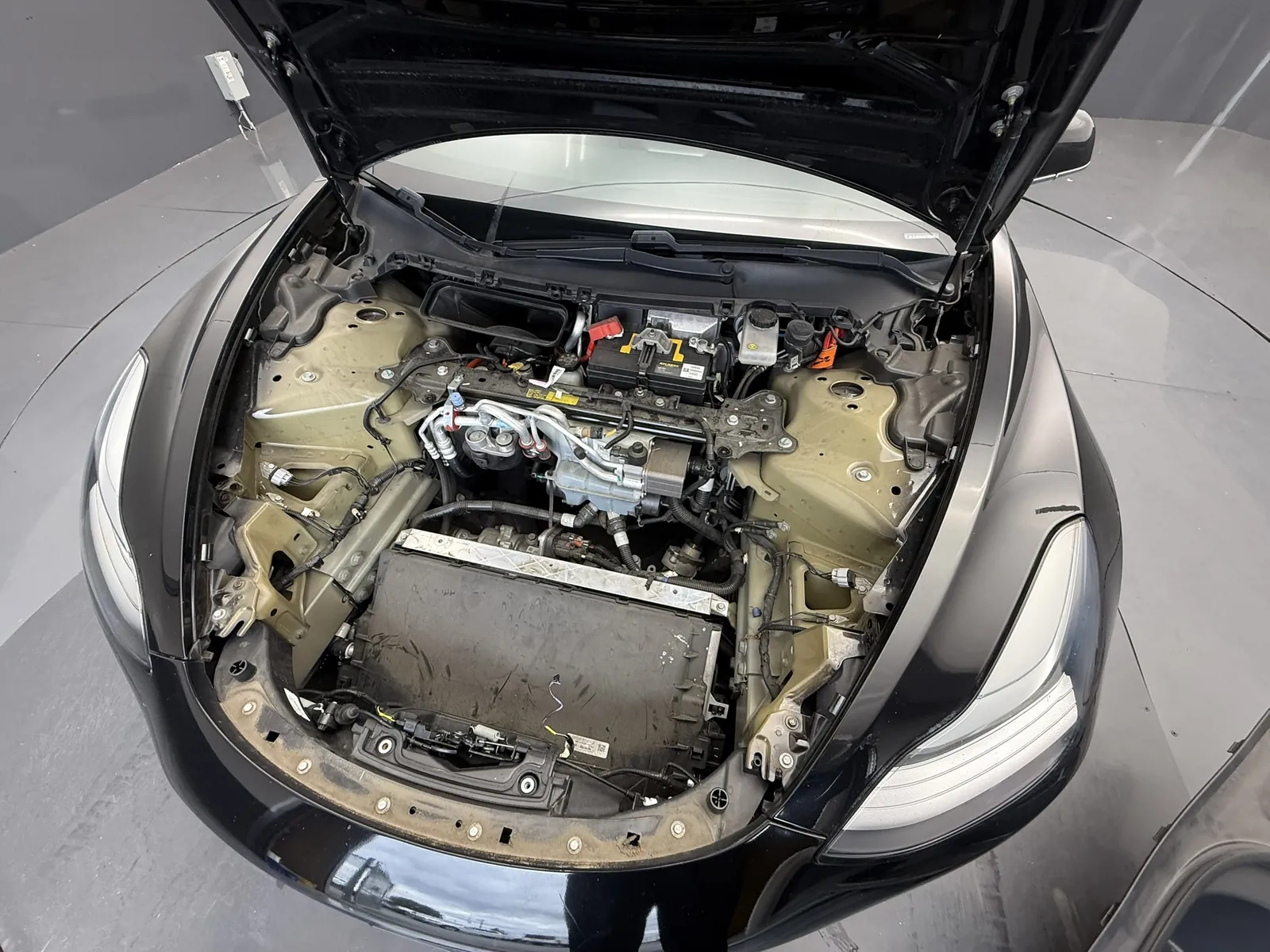
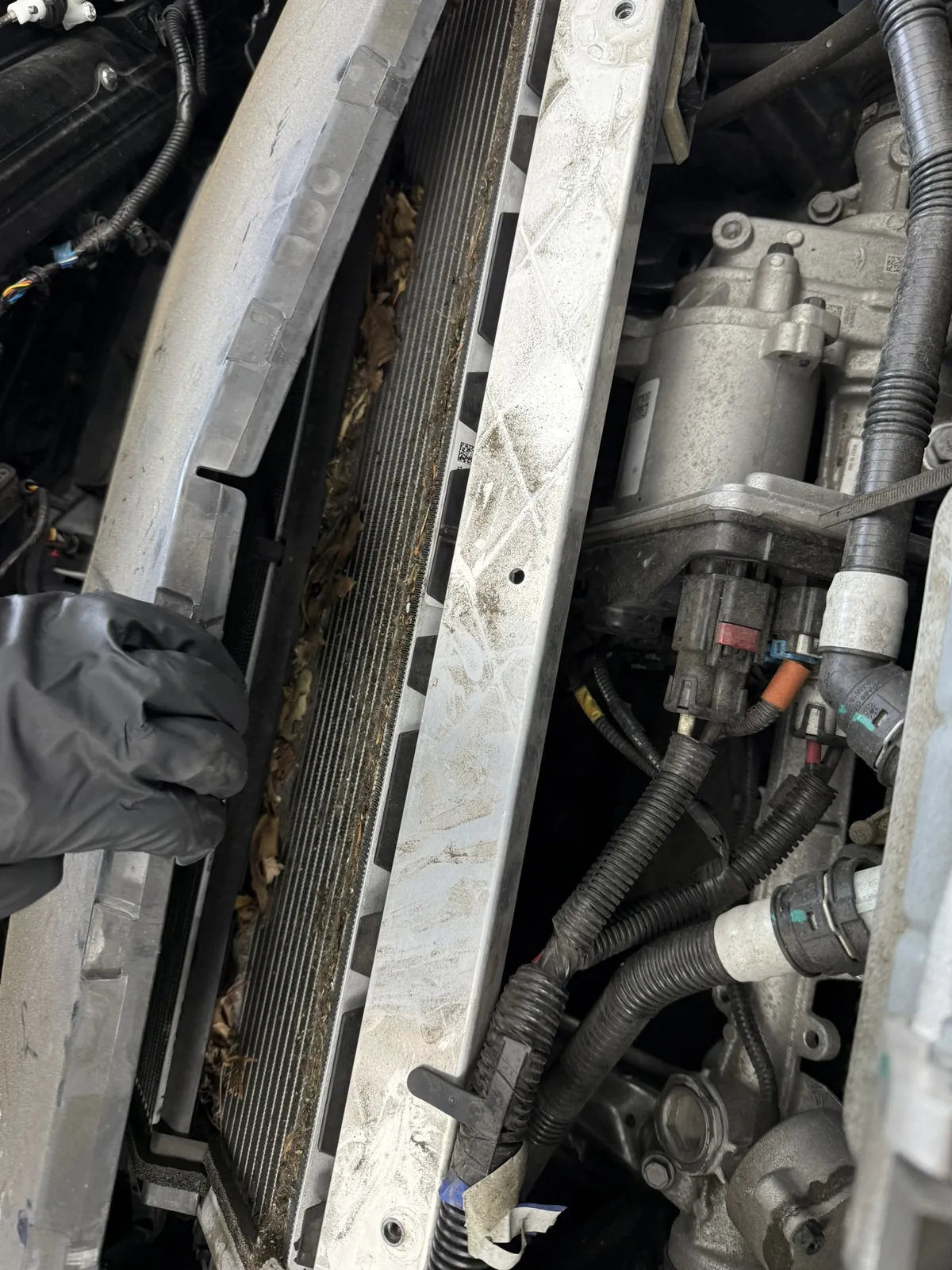
On a Model 3 or Model Y, the radiator sits under the front trunk (frunk) tub, behind the small grille opening low in the bumper. On my car, the leaves build up in front of it, behind the bumper, where you can't see them unless you pull the tub.
One independent EV shop in Alberta that works on Teslas every day explains why these cars are prone to it: [9]
- The radiator lies at about a 30 degree angle, closer to flat than upright, so debris tends to sit on it instead of falling off.
- The ducting is tight, so nearly all the air from the grille goes through the radiator, along with whatever it carries.
- The grille opening is only about 6 inches off the pavement.
The shop calls a plugged radiator a "when it happens, not if it happens" issue on the Model 3 and Model Y. [9] That's their opinion, but it lines up with what I've seen on my own car.
What's actually up front depends on the car. Model 3s from 2017 to 2020 don't have a heat pump. They have a regular A/C condenser mounted in front of the coolant radiator, and it's usually the condenser that plugs up. Heat pump cars (every Model Y, and the Model 3 from 2021) have just the radiator up front. [9] You can check which one a car has: Controls > Software > Additional Vehicle Information. [1]
Why the computer cares
The car computer (the Autopilot or FSD computer) isn't cooled by a fan. It's on the liquid cooling loop. Tesla's own service manual lists a coolant hose that runs from the chiller "to Car Computer and HV Battery Supply Manifold." [4] Not a Tesla App reports that on HW3 cars the computer sits at the top of the coolant loop, the farthest point from the radiator, so any loss of cooling hits it hardest. [11]
When the computer's board goes over 90°C, the car sets an alert called APP_w141_ECU_Thermal_Issue. Its description says the board temperature is out of range, and the possible impact is that "Autopilot may shut down, resulting in all Autopilot features being unavailable." [12] It clears once the board cools back down. [12]
Symptoms to watch for
What Tesla says: a clogged radiator can affect airflow and heating and A/C performance. [2][3]
What one independent EV shop says its clients most often notice when the radiator is getting restricted: [9]
- Weak A/C, especially when the car is sitting still
- Weak heat in winter
- The car can't hold the cabin temperature in Dog Mode
- Supercharging starts at the normal rate, then drops off to a much slower one
- The radiator fans are louder, run more, or keep running after you park
- The Autopilot computer overheats, or the touchscreen keeps shutting off, especially in hot weather
A second independent shop, in Sacramento, lists a "Speed Limited" message among the warning signs of a packed condenser. [22]
What owners report when the computer overheats (anecdotal):
- Red steering wheel "take over immediately" alerts, with FSD forced off [10][15]
- The "Start Self-Driving" button goes away until the computer cools down [11]
- Camera unavailable, park assist and automatic emergency braking alerts [12][13]
Confirmed vs. owner reports
Confirmed (Tesla's own documents):
- The radiator can clog, and Tesla tracks radiator cleaning as a maintenance item on newer software. [1][2][3]
- Tesla has written service procedures for cleaning it on both the Model 3 and Model Y, and it keeps updating them. In 2026 alone it added a step for cleaning under the cooling fan, a partial radiator removal method, a water rinse method using a special kit that runs off shop air, and (on the Model Y) a software step to reset the car's radiator reading after cleaning. [4][5][6][7]
- The car computer is on the liquid cooling loop. [4]
- The computer has a thermal alert at 90°C that can shut off Autopilot features. [12]
Reported, not confirmed:
- That a clogged radiator alone killed a computer. One Model 3 owner on Tesla Motors Club (2023 Model 3 Performance, 59,000 miles, out of warranty) says the A/C stopped cooling, the fan ran nonstop and camera errors appeared. He says the service center blamed debris in the radiator that came in through the lower grille, said the computer had overheated, and quoted about $1,300 for the A/C and $2,300 for a new computer. [13] A Model Y owner with 156,000 miles reports a "completely clogged" radiator, A/C that quit in the afternoon heat, and service alerts that the Autopilot computer couldn't cool. Cleaning it fixed everything. [14]
- That FSD v14 Lite is cooking HW3 computers. After Tesla pushed v14 Lite to HW3 cars in wide release on July 21, 2026, owners started posting overheating alerts, and some said Tesla Service told them the computer had failed. [10][11] Electrek was careful to say the thermal fault predates v14 Lite by years, is "usually traced to the cooling loop" (low coolant, air pockets, or a clogged radiator), and that Tesla has not confirmed software is causing hardware to fail. [10] Tesla hadn't commented as of early August. [19] This week, owners on Tesla Motors Club are still debating whether the newest update fixed it. One says it didn't, and another says his computer was replaced under warranty and has been fine since. [17]
- Other causes. Owners and forum regulars also point to air trapped in the coolant and wear inside the computer itself. In one June 2026 case on a 2022 Model Y, Tesla replaced the computer, and the owner says the repair would have been just under $2,800 before tax without his extended service plan. [15][16]
- How Tesla handles the bill. I found no published Tesla policy on thermal computer failures. Owners report it going every way: replaced under the factory warranty, covered by an extended service plan, or paid out of pocket. A few say the price came down after they pushed back. One owner just out of warranty says a $3,300 estimate dropped to $2,200, and another says a $2,800 quote dropped to $2,100. [15][17][24][25] Those are anecdotes, not a policy, but they're worth knowing if you're on the hook.
I could not find a Tesla service bulletin, recall or warranty extension for either problem as of October 23, 2026.
My take: a clean radiator won't guarantee your computer never fails, but a packed one makes everything in that loop work harder. If you're on HW3 and run FSD a lot, especially on hot days, it's the first thing I'd rule out.
How I clean mine
Tesla leaves it up to you. The Model Y manual says: "To clean, do it yourself by navigating to the Service Manual. Alternatively, use the mobile app to schedule a service appointment." [3] I've done it myself on my car. You can also have Tesla do it.
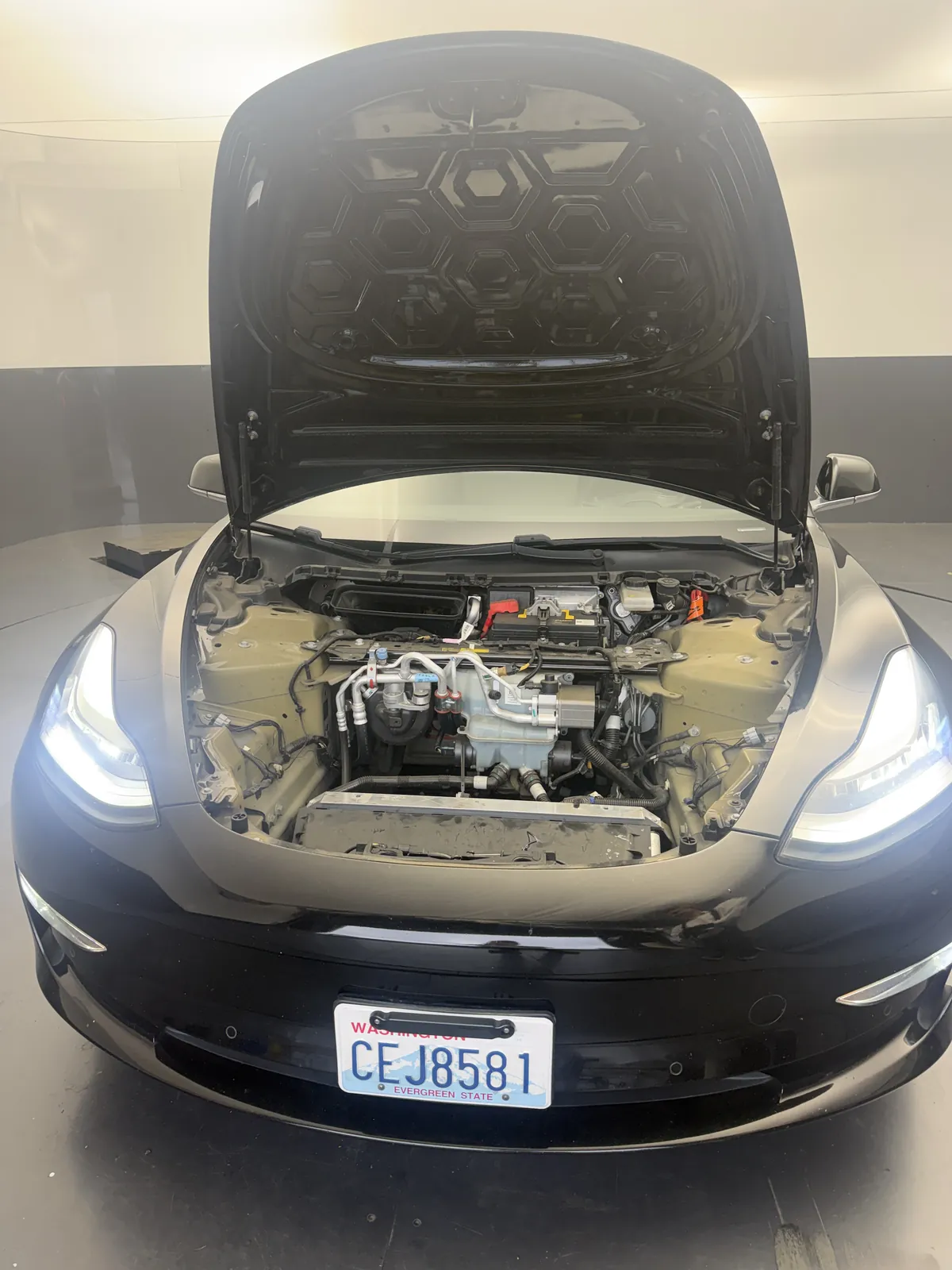
The car in these photos is my own 2019 Model 3, and this was the first time I'd cleaned it. Being a 2019, it's one of the Model 3s without a heat pump, so the condenser sits in front of the radiator. [1][4]
Here's how it went for me. The job took about 45 minutes, and most of that is getting the plastic tub out of the frunk. Once it's out, you can see down to the front of the cooling stack. I used a shop vac with a narrow nozzle. If you don't have one that fits, you can make your own out of something soft, like rolled-up cardboard. Go easy. The metal fins on the radiator are thin and bend or break without much force, so don't scrape at them.
Honestly, it's hard to get all the way to the radiator without pulling more parts off, and I didn't want to go that far. So I vacuumed what I could reach and left the rest.
How often? I don't get much debris where I live, so every few years is enough for me. If I lived somewhere with lots of leaves and junk on the ground, I'd do it every year.
For reference, here's what Tesla's own procedure for a 2017 to 2020 Model 3 involves: [4][8]
- Pull the frunk tub. That means the rear underhood apron, the cabin air intake duct, the hood latch cover, the carpet, seven 10 mm bolts and ten clips. Tesla says to replace any broken or missing clips. [8]
- Remove the active grille shutter, then detach the radiator from the condenser and lift it up with the hoses still attached. [4]
- Vacuum first, then use compressed air, keeping the nozzle back from the fins and straight on (90 degrees) to the surface. Then do the same to the condenser. [4]
- Clean out under the cooling fan, where debris collects too. [4]
Tesla rates its basic Model 3 and Model Y cleaning jobs at roughly an hour or a bit more of shop time, on a lift. [4][5][7] What I can reach with the tub out is the loose stuff sitting on top. A full clean goes deeper than that.
Have Tesla or a shop do it if: the car is still under warranty and you don't want any question about it (more on that below), you're seeing overheating alerts, or the radiator is packed deeper than you can reach.
What not to do
- Don't blast it with high pressure. Bent fins block airflow too. Tesla's own procedures tell technicians to keep the nozzle back from the fins and pointed straight at the surface, including with its newer water rinse kit. [4][6] The shop above says the same about car wash rinsing: watch your spray direction and avoid very high pressure. [9]
- Don't open the coolant reservoir. Tesla says damage caused by opening the battery coolant reservoir is excluded from the warranty. [2][3]
- Keep your hands clear of the fans. Tesla warns some cooling fans run even when the car is off. [2]
- Don't force the tub clips or crush the wiring. Tesla's tub procedure says to check a high voltage interlock wire near the A/C compressor for crushing or worn insulation, and to make sure nothing has dropped into the hood latch before closing up. [8]
- Know the warranty fine print. Tesla's manual says damage or failures caused by maintenance done by non-Tesla-certified technicians aren't covered by the warranty. [2] On a car under warranty, I'd weigh that before taking it apart.
- Look, don't touch, in Service Mode. It's labeled for professional technicians, and the shop warns some of its tools can damage the car if used wrong. [9]
How to check a used Tesla before you buy
This is a five minute check I'd add to any test drive:
- Look through the lower grille with a flashlight. If the grille shutters are closed, the shop above says turning on Pet Mode should open them. [9] Leaves, bugs and grime packed on the fins are a sign it hasn't been done. A clean-looking front doesn't prove much, though. The Sacramento shop says the worst of it packs into the gap between the condenser and the radiator, and one owner guide says vacuuming through the grille doesn't reach it. [21][22]
- Check Controls > Service > Maintenance. On software 2024.44.25 or newer, Tesla shows radiator cleaning there, and the record stays with the car even after a factory reset. [1][2] An overdue item, or no record on a high-mileage car, tells you something.
- The "radiator health" number. Newer software also shows a radiator health percentage in Service Mode, under Thermal. One owner says it's on the Coolant System screen. It turned up on spring and summer 2026 software: one owner mentions 2026.14.3, and an owner guide says the 2026.20 updates changed it from a plain 100 or 0 to an actual percentage. [20][21] I'd treat it as a hint, not a verdict. Tesla hasn't published how it's calculated, and the shop in Alberta says it can be wrong. [9][21] Several owners of 2018 to 2020 Model 3s without a heat pump report a red 0% reading on cars that pass Tesla's thermal tests. Others report the number not coming back up after a cleaning. [20][21] One shop, on the other hand, says it has seen readings like 62% on clogged cars and checks that the number returns to 100% after cleaning. [22] A low number on a heat pump car is worth a closer look. A 0% on an older Model 3 with good A/C and normal Supercharging is probably not a reason to walk.
- Test the A/C at a standstill. Let the car idle with the A/C on max for a few minutes. Weak cold air, or fans roaring nonstop, is worth asking about. [9]
- Ask for service history. Any visits for A/C, coolant or the computer? A replaced computer isn't a deal breaker if the cause was fixed.
- If the car has FSD, use it on the test drive and watch for red-wheel takeover alerts or the self-driving button disappearing. [10][11]
- Know where the warranty stands. Basic coverage is 4 years or 50,000 miles. A Tesla Certified Pre-Owned car gets whatever is left of that, plus 1 year or 10,000 miles after it runs out. Tesla offers an optional Extended Service Agreement for Model 3 and Model Y. The warranty follows the car when the ownership transfer goes through Tesla. [18] A computer failure past that point is on you.
If the seller is OK with it and you have some time, the frunk tub is the same one I pulled on my own car. With it out, you can look down at the front of the stack for leaves. Be gentle, the fins are thin. If you'd rather not take anything apart on someone else's car, steps 1 through 3 still tell you a lot.
My rule: dirty radiator, weak A/C, or overheating alerts don't kill the deal by themselves. They're a negotiating point and a to-do list. Budget for a cleaning, and if the computer is already acting up, get it diagnosed before you buy.
Keeping it clean
- A grille screen. The shop above recommends an aftermarket clip-in grille screen, and the Model 3 owner on Tesla Motors Club says Tesla Service told him the same thing. [9][13] I've never run one on my car, and I'd want to look into them more before I recommend one.
- A gentle rinse through the grille at the car wash, avoiding very high pressure so you don't fold the fins. [9]
- Match the schedule to where you live. For me that's every few years with light debris, or every year if there are lots of leaves on the ground. That's my opinion, not a Tesla schedule. Tesla's interval depends on the car and where you drive, and newer software tells you when it's due. [1]
Quick checklist
- ☐ Look through the lower grille for leaves and grime
- ☐ Controls > Service > Maintenance: radiator cleaning status
- ☐ Controls > Software > Additional Vehicle Information: heat pump or not
- ☐ A/C cold at idle, fans not roaring
- ☐ No red-wheel takeover or "self-driving unavailable" alerts on an FSD drive
- ☐ Service history for A/C, coolant or computer work
- ☐ Warranty status in the Tesla app (Specs & Warranty)
- ☐ Budget for a cleaning if it's dirty
Then run through my full pre-purchase checklist and the HW3 vs HW4 guide.
Sources
- Tesla Support, Vehicle Maintenance (Radiator Cleaning; Air Conditioning Service), checked Oct 23, 2026: https://www.tesla.com/support/vehicle-maintenance
- Tesla, Model 3 Owner's Manual (2017-2023), Maintenance Service Intervals, checked Oct 23, 2026: https://www.tesla.com/ownersmanual/2017_2023_model3/en_us/GUID-E95DAAD9-646E-4249-9930-B109ED7B1D91.html
- Tesla, Model Y Do It Yourself guide, Maintenance Service Intervals, checked Oct 23, 2026: https://service.tesla.com/docs/Public/diy/modely/en_us/GUID-E95DAAD9-646E-4249-9930-B109ED7B1D91.html
- Tesla Model 3 Service Manual, Clean Radiator (Non-Heat Pump) (revised Jun 15, 2026): https://service.tesla.com/docs/Model3/ServiceManual/en-us/GUID-230ED983-A599-4787-9D8D-902BD3ECBA56.html
- Tesla Model 3 Service Manual, Clean Radiator (Heat Pump) (revised Nov 11, 2025): https://service.tesla.com/docs/Model3/ServiceManual/en-us/GUID-4728D5BB-C86A-458E-B1E8-4AC8625BEE03.html
- Tesla Model 3 Service Manual, Clean Radiator (Heat Pump) (Pressure Washer Kit) (Maintenance) (released Jun 10, 2026): https://service.tesla.com/docs/Model3/ServiceManual/en-us/GUID-2D0E5E6F-B8E8-4FAC-80BF-E44473DCD360.html
- Tesla Model Y 2025+ Service Manual, Clean Radiator (Maintenance) (revised Aug 3, 2026): https://service.tesla.com/docs/ModelY/ServiceManual/2025/en-us/GUID-6F916783-49F9-4AD2-BF65-E9AFC48955B2.html
- Tesla Model 3 Service Manual, Underhood Storage Unit (Remove and Replace): https://service.tesla.com/docs/Model3/ServiceManual/en-us/GUID-4FBD5199-27DF-4D9D-A193-1901CE127862.html
- My Garage (independent EV shop, Airdrie, Alberta), Tesla Radiator Cleaning (Aug 20, 2026): https://mygarageairdrie.ca/tesla-radiator-cleaning/
- Electrek, Tesla FSD v14 Lite tied to rising HW3 computer failures, owners report (Aug 3, 2026): https://electrek.co/2026/08/03/tesla-fsd-v14-lite-hw3-computer-failures/
- Not a Tesla App, Tesla HW3 Computers Are Overheating on FSD V14 Lite (Aug 4, 2026): https://www.notateslaapp.com/news/4536/tesla-hw3-computers-are-overheating-on-fsd-v14-lite
- Tesla Oracle, Tesla rolls out FSD v14.1 Lite after HW3 ECU overheating issues in FSD v14 Lite (Aug 11, 2026): https://www.teslaoracle.com/2026/08/11/tesla-rolls-out-fsd-v14-1-lite-after-hw3-ecu-overheating-issues-in-fsd-v14-lite/
- Tesla Motors Club, Clogged A/C radiator caused computer meltdown (owner report, accessed Oct 23, 2026): https://teslamotorsclub.com/tmc/threads/clogged-a-c-radiator-caused-computer-meltdown-looking-for-help.347606/
- Reddit r/TeslaModelY, My AC problems and the fix (owner report, Jun 2024): https://www.reddit.com/r/TeslaModelY/comments/1dmarzb/my_ac_problems_and_the_fix/
- Reddit r/TeslaSupport, App_w141_ECU_Thermal_Issue (owner report, Jun 2026): https://www.reddit.com/r/TeslaSupport/comments/1tvfv0q/app_w141_ecu_thermal_issue/
- Reddit r/TeslaSupport, Autopilot Overheating 2020 M3 AWD (owner reports, Sep 2025): https://www.reddit.com/r/TeslaSupport/comments/1nrvhg2/autopilot_overheating_2020_m3_awd/
- Tesla Motors Club, FSD V14.3 lite: is computer over heating fixed in 2026.38.5.1 (owner reports, Oct 2026): https://teslamotorsclub.com/tmc/threads/fsd-v14-3-lite-is-computer-over-heating-fixed-in-2026-38-5-1.359479/
- Tesla Support, Vehicle Warranty, checked Oct 23, 2026: https://www.tesla.com/support/vehicle-warranty
- heise autos, Tesla: Overheating problems with FSD software on HW3 computers (Aug 5, 2026): https://www.heise.de/en/news/Tesla-Overheating-problems-with-FSD-software-on-HW3-computers-11400238.html
- Tesla Motors Club, How often do you clean the radiator? (owner reports, Apr to May 2026): https://teslamotorsclub.com/tmc/threads/how-often-do-you-clean-the-radiator.354879/page-3
- Tesla FAQ BY (owner community guide), Radiator health in Service Mode (updated Sep 20, 2026): https://tesla.zverski.eu/en/articles/all-radiator-health-service-mode
- AT Automotive (independent shop, Sacramento), Tesla Condenser and Radiator Cleaning, accessed Oct 23, 2026: https://atautomotivehybrid.com/tesla-condenser-cleaning-sacramento/
- Reddit r/TeslaSupport, $3,369.88 for car computer replacement? (owner report, Sep 15, 2026): https://www.reddit.com/r/TeslaSupport/comments/1wgz0n1/336988_for_car_computer_replacement_my_cars_only/
- Reddit r/TeslaSupport, Tesla wants $2800 for HW3 computer 2022 MY (owner reports, Aug 2026): https://www.reddit.com/r/TeslaSupport/comments/1vnnoyf/tesla_wants_2800_for_hw3_computer_2022_my/
- Tesla Owners Online, $3k for new computer, just out of warranty? (owner report, Jan 2026): https://www.teslaownersonline.com/threads/3k-for-new-computer-just-out-of-warranty.37338/